【踩坑日志】Electron 开发者工具无法鼠标右键打开菜单
Electron 可以通过 webContents.openDevTools() 打开开发者工具
有时候通过元素面板右键 存储为全局变量 进行调试,
忽然有一天发现右键菜单不见了😨
寻找源头
搜索 issues 发现 #38589,原来是 electron 依赖的 chromium,默认布局改变了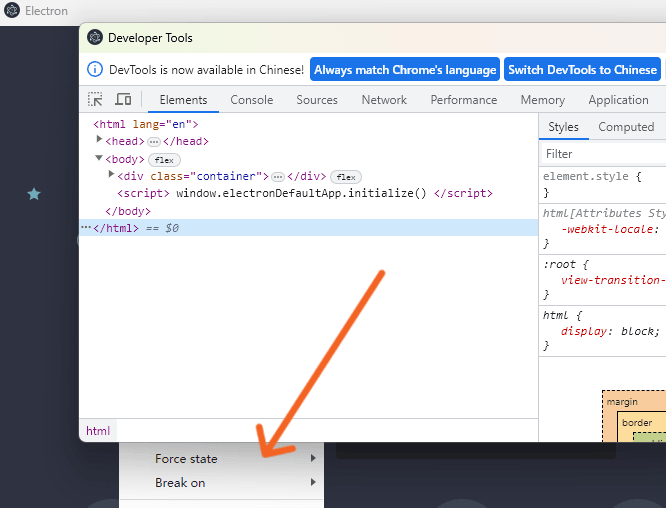
出现在electron的 v25.0.0 版本
#38790
codebytere commented 6/15 18:24
Tracked tov25.0.0-nightly.20230323...v25.0.0-nightly.20230324
解决问题
布局错误导致菜单渲染在窗口的下方
解决办法是在 main.js 中禁用 WidgetLayering
main.js
import { app } from 'electron';app.commandLine.appendSwitch('disable-features', 'WidgetLayering');#38790
codebytere commented 6/15 20:01
Looks like it's this: https://chromium-review.googlesource.com/c/chromium/src/+/4356117
For now, this can be worked around by adding:app.commandLine.appendSwitch('disable-features', 'WidgetLayering');to your code.